
Difference between revisions of "HowTo:Configure UBIK Credentials Service"
(→Overview) |
|||
| Line 10: | Line 10: | ||
* Install the UBIK Credentials Portal on the IIS Server. | * Install the UBIK Credentials Portal on the IIS Server. | ||
* If the IIS Server does not have it installed, download and install the .NET 8.0 Hosting Bundle from Microsoft. This bundle includes the .NET Runtime and the ASP.NET Core Runtime required for hosting ASP.NET Core applications on IIS. | * If the IIS Server does not have it installed, download and install the .NET 8.0 Hosting Bundle from Microsoft. This bundle includes the .NET Runtime and the ASP.NET Core Runtime required for hosting ASP.NET Core applications on IIS. | ||
| − | |||
* Make sure all published application files are accessible. | * Make sure all published application files are accessible. | ||
| − | * Configure the application by modifying the | + | * Configure the application by modifying the '''appsettings.json''' file included in the published UBIK Credentials Portal package. |
| + | |||
= Installation UBIK Credentials Portal = | = Installation UBIK Credentials Portal = | ||
Revision as of 06:51, 11 August 2026
- UBIK Credentials Portal
- Overview
- Installation UBIK Credentials Portal
- Setting up UBIK Credentials Portal
- See also
UBIK Credentials Portal
The UBIK Credentials Portal is an ASP.NET Core web application that provides a web-based self-service interface for users to securely define their initial password and reset forgotten passwords. The portal communicates with the UBIK USAM WebService to perform password management operations.
This page describes how to install, configure and use the UBIK Credentials Portal.
Overview
- Make sure the USAM is installed on the IIS Server.
- Install the UBIK Credentials Portal on the IIS Server.
- If the IIS Server does not have it installed, download and install the .NET 8.0 Hosting Bundle from Microsoft. This bundle includes the .NET Runtime and the ASP.NET Core Runtime required for hosting ASP.NET Core applications on IIS.
- Make sure all published application files are accessible.
- Configure the application by modifying the appsettings.json file included in the published UBIK Credentials Portal package.
Installation UBIK Credentials Portal
- Download the UBIK Credentials Portal package from the Augmensys release portal.
- Deploy the published UBIK Credentials Portal files to the designated website folder on the IIS Server (create the folder if necessary).
- IIS Manager setting check: see IIS Manager
IIS Manager
- Add a new website under the **Sites** folder in IIS Manager.
- "Site Name", "Application pool", "Physical path", "Binding", "Host Name", "Port" and "SSL Certificate" should be adapted accordingly.
- Example settings.
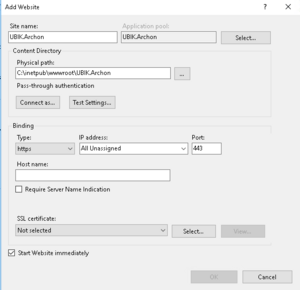

 | When setting up the IIS Application Pool responsible for the Credentials Portal, the Load User Profile setting should be enabled. |
Setting up UBIK Credentials Portal
Firewall settings
Firewall and Router settings must be adapted so the Credentials Portal can be accessed from outside the IIS Server.
- Create a new inbound rule in the Windows Firewall using the same port configured in the IIS website binding.
- Configure port forwarding on the router using the same port if external access is required.
USAM Connection
The Credentials Portal communicates with the UBIK USAM WebService.
Open the **appsettings.json** file included in the published UBIK Credentials Portal package and configure the USAM endpoint.
"BaseUrl": "https://hostname:port/PathToUsam/USAM.svc/"
}
Password Policy
The Credentials Portal supports configurable password policies to enforce secure passwords.
The following settings can be configured:
- Minimum password length
- Require at least one lowercase character
- Require at least one uppercase character
- Require at least one digit
- Require at least one special character
Example:
"MinLength": 8,
"RequireUpperCase": true,
"RequireLowerCase": true,
"RequireDigit": true,
"RequireSpecialCharacter": true
}
Portal Appearance
The appearance of the portal can be customized.
The following properties can be configured:
- Portal title
- Background (brand) color
- Font color
- Portal icon
Example:
"PortalTitle": "Your preferred text here",
"BrandColor": "#F16FFF",
"BrandFontColor": "#FFFFFF",
"IconUrl": "https://yourdomain.com/icon.png"
}
