Difference between revisions of "HowTo:Install UBIK Client Certificate"
m (→Automatic Import) |
(→Android) |
||
| Line 2: | Line 2: | ||
= Android = | = Android = | ||
| − | + | {{DeprecatedStartTag}} | |
=== Manual installation === | === Manual installation === | ||
One can add server certificates to the {{UBIK Android}} application in addition to the pre-installed certificates, using a button in the ''Info'' menu. {{Version/AndroidSince|2.3.1}} | One can add server certificates to the {{UBIK Android}} application in addition to the pre-installed certificates, using a button in the ''Info'' menu. {{Version/AndroidSince|2.3.1}} | ||
| Line 39: | Line 39: | ||
{{Clear}} | {{Clear}} | ||
| + | |||
| + | [[Category:2.5.1|Install UBIK Client Certificate]] | ||
| + | [[Category:Android|Install UBIK Client Certificate]] | ||
| + | [[Category:How-To|Install UBIK Client Certificate]] | ||
| + | [[Category:Installing|Install UBIK Client Certificate]] | ||
| + | [[Category:WinX|Install UBIK Client Certificate]] | ||
= WinX / Web = | = WinX / Web = | ||
Revision as of 13:31, 23 June 2026
Setting up a client certificate for using a secure channel to the web service.
Android
 |
THIS WIKI AREA IS DEPRECATED |
|
This content is no longer being maintained and may be outdated.
|
|
Manual installation
One can add server certificates to the UBIK® Android application in addition to the pre-installed certificates, using a button in the Info menu.
- Copy the certificate to your device's SD card where you can find it easily.
- Open the UBIK Android application.
- Press the Home button in the Action Bar.
- Press the Info button in the drop-down menu.
- On the Info screen, press the Install Certificate button.
- Select a file browser in order to select the certificate file.
- Choose the certificate file you earlier copied to the device's SD card.
If the adding was successful, a toast message confirming the installation will appear. Else, the toast's text will indicate an error.
The certificate will be stored in a BouncyCastle keystore on the device's file system (path: SD-Card/UBIK/Certificates). This means you can copy this keystore and reuse it on another device by pasting it there!
 | A file browser app has to be installed on your device in order to select the certificate file from the SD-card. |
Automatic Import
One can place certificate files in a predefined folder in order for them to be imported automatically when the app starts up the next time.
The folder depends on the application:
<sd-card>/Android/data/com.augmensys.ubik.<custom_app>/files/cert
Certificate list

In the Info screen, there is a button Show certificates that opens a list of all installed certificates, displaying their subject and expiry date.
| The certificate has to be provided as a X.509 DER encoded file, e.g. *.cer |
 | The certificate will remain on the device even if the application is reinstalled. |
WinX / Web
The clients, either WinX or Web, need to have a certificate installed if the connection to the web service should use secure communication (HTTPS). This certificate can either be a root authority certificate, a self-signed or any other public key certificate from a certificate authority enabling a secured connection between the web service and the clients.
If you already have a public key certificate available you can use this on the clients and web service. Otherwise you can create a certificate as described in Create UBIK Web Service Certificates.
As the UBIK® Web client connects to the content server similar as any mobile client it needs also to be authorized using a certificate. Hence, whatever machine hosts the UBIK® Web client application needs to have the certificate installed.
Install Root Authority Certificate
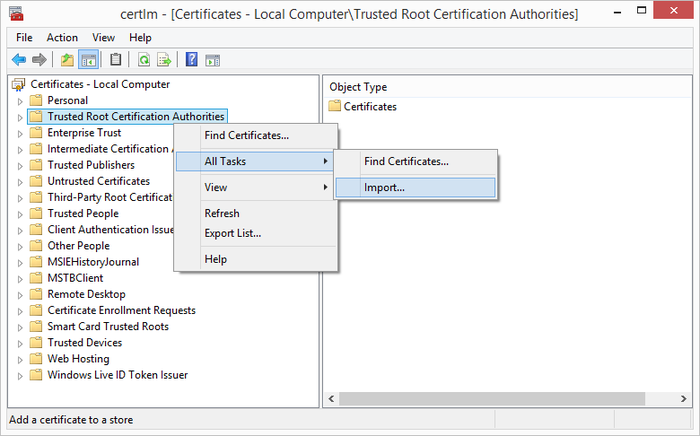
To import the certificate, start the certificate manager by entering Manage computer certificates in the Windows Start Screen (alternatively, start the program certmgr):
- Go to section Trusted Root Certification Authorities and open the context menu.
- Click on All Tasks
- Use Import... to import the Root Certificate provided as *.cer file.