Difference between revisions of "HowTo:Make a Document ready for Redlining"
m |
(→Android) |
||
| Line 19: | Line 19: | ||
= Android = | = Android = | ||
| + | {{DeprecatedStartTag}} | ||
| + | |||
Once the configuration has been completely accomplished on the server side the '''Redline Document''' function should be available on the mobile client. | Once the configuration has been completely accomplished on the server side the '''Redline Document''' function should be available on the mobile client. | ||
# Long-click a document's thumbnail [[UBIK_Client_Basics#Content_Browser|Content Browser]] | # Long-click a document's thumbnail [[UBIK_Client_Basics#Content_Browser|Content Browser]] | ||
Latest revision as of 13:42, 23 June 2026
The redlining feature creates a copy of the document and opens it for editing with any installed 3rd party application. Enabling redlining for certain document objects requires that the following criteria are met:
[edit]
Studio
Criterion 1: A file document MetaClass is prepared for Redlining
- Set the SYSCLS REDLINEDFILE classification on a MetaClass for file documents using the Class Details control (the MetaClass must derive from FILEDOCUMENT)
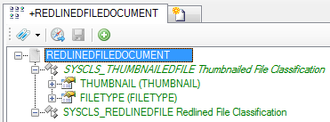
- Check if all required MetaProperties are implemented

Criterion 2: File documents can be created as child objects of other file documents
- Create a new relation between the MetaClasse of the original file document and the redlined file document


Criterion 3: View items for the (redlined) file document exist
- Create the view items for the file documents if they do not already exist (existing view items for file documents might be sufficient)
- Relate the view items to the according View and test the result in the View Test Environment (redlined documents can be created as child objects of other documents)
Criterion 4: Context scopes for the redlined file document exist and such file document can be created on the UBIK® Client
- Create a context scope for the redlined file document (an existing context scope for file documents might be sufficient

- Enable the creation of the document on the UBIK® Client and configure at least the Description property in the ACM
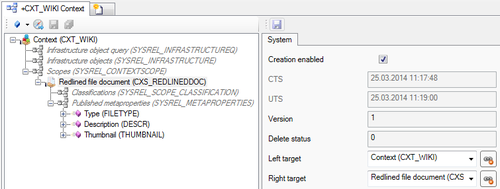
- If a thumbnail should be displayed on the mobile client configure the Thumbnail property as well


Android
 |
THIS WIKI AREA IS DEPRECATED |
|
This content is no longer being maintained and may be outdated.
|
|
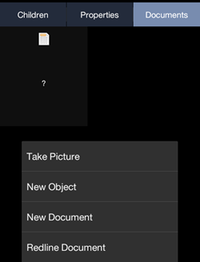
Once the configuration has been completely accomplished on the server side the Redline Document function should be available on the mobile client.
- Long-click a document's thumbnail Content Browser
- Access the menu and choose Redline Document