
Difference between revisions of "HowTo:Finish/Reset a Task (UBIK Android)"
(Created page with "== Finish a Task == # When a task is open, browse to its content list view or its property list view; # Click the Checkbox or {{key press|Finish}};<br/>[[File:UI_Android_Finis...") |
|||
| (6 intermediate revisions by 2 users not shown) | |||
| Line 1: | Line 1: | ||
| + | {{DeprecatedStartTag}} | ||
| + | |||
== Finish a Task == | == Finish a Task == | ||
# When a task is open, browse to its content list view or its property list view; | # When a task is open, browse to its content list view or its property list view; | ||
| − | # Click the Checkbox or {{key press|Finish}};<br/>[[File:UI_Android_Finish_Task_Through_Checkbox.jpg| | + | # Click the Checkbox or {{key press|Finish}};<br/>[[File:UI_Android_Finish_Task_Through_Checkbox.jpg|300 px|border|alt=Click the Checkbox to Finish a Task|Click the Checkbox to Finish a Task]][[File:UI_Android_Finish_Task_Through_Button.jpg|300 px|border|alt=Click the Button to Finish a Task|Click the Button to Finish a Task]] |
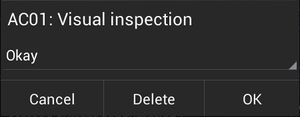
# Enter values for the follow-up property editors and press {{key press|OK}} one after another (if there's more than one property to be edited);<br/>[[File:UI_Android_Finish_Task_Entering_Values.jpg|300 px|border|alt=Enter Values to Finish a Task|Enter Values to Finish a Task]] | # Enter values for the follow-up property editors and press {{key press|OK}} one after another (if there's more than one property to be edited);<br/>[[File:UI_Android_Finish_Task_Entering_Values.jpg|300 px|border|alt=Enter Values to Finish a Task|Enter Values to Finish a Task]] | ||
| − | |||
{{Attention|Users will remain at the same view where they try to finish the task. In case {{UBIK}} is in [[Sync Mode#Possible sync modes|automatic mode]], the finished task will be immediately committed if user finishes it through a click on the Checkbox.}} | {{Attention|Users will remain at the same view where they try to finish the task. In case {{UBIK}} is in [[Sync Mode#Possible sync modes|automatic mode]], the finished task will be immediately committed if user finishes it through a click on the Checkbox.}} | ||
== Reset a Task == | == Reset a Task == | ||
| − | # When a task is finished, | + | # When a task is finished, browse to its content list view or its property list view; |
| − | # Click the Checkbox or {{key press|Reset}};<br/>[[File:UI_Android_Reset_Task_Through_Checkbox.jpg| | + | # Click the Checkbox or {{key press|Reset}};<br/>[[File:UI_Android_Reset_Task_Through_Checkbox.jpg|300 px|border|alt=Click the Checkbox to Reset a Task|Click the Checkbox to Reset a Task]][[File:UI_Android_Reset_Task_Through_Button.jpg|300 px|border|alt=Click the Button to Reset a Task|Click the Button to Reset a Task]] |
| − | + | ||
{{Attention|Similarly, users will remain at the same view and the reset task will be committed in the same manner.}} | {{Attention|Similarly, users will remain at the same view and the reset task will be committed in the same manner.}} | ||
== See also == | == See also == | ||
| + | * [[Task Objects (UBIK Android)]] | ||
| − | [[Task | + | [[Category:Android|Finish/Reset a Task (UBIK Android)]] |
| − | + | [[Category:How-To|Finish/Reset a Task (UBIK Android)]] | |
| − | + | ||
| − | + | ||
| − | [[Category:How-To]] | + | |
Latest revision as of 13:34, 23 June 2026
 |
THIS WIKI AREA IS DEPRECATED |
|
This content is no longer being maintained and may be outdated.
|
|
Finish a Task
- When a task is open, browse to its content list view or its property list view;
- Click the Checkbox or Finish;
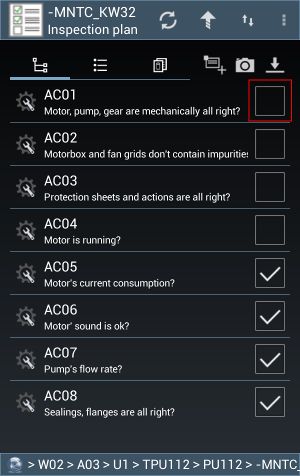
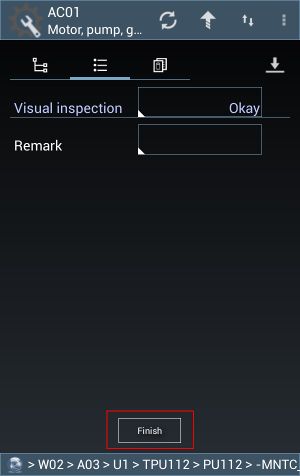
- Enter values for the follow-up property editors and press OK one after another (if there's more than one property to be edited);


 | Users will remain at the same view where they try to finish the task. In case UBIK® is in automatic mode, the finished task will be immediately committed if user finishes it through a click on the Checkbox. |
Reset a Task
- When a task is finished, browse to its content list view or its property list view;
- Click the Checkbox or Reset;
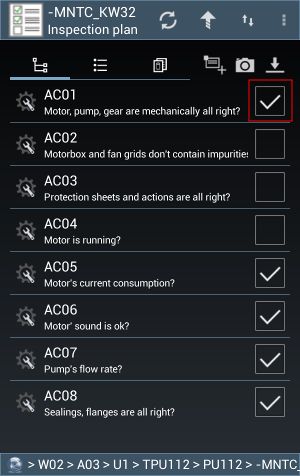
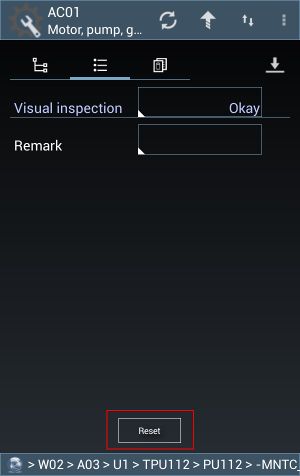


| Similarly, users will remain at the same view and the reset task will be committed in the same manner. |
