Difference between revisions of "HowTo:Install UBIK Client Certificate"
m |
m |
||
| Line 31: | Line 31: | ||
== Certificate list == | == Certificate list == | ||
| − | |||
[[File:UBIK_Android_UI_Info_Activity_Certificate_List.png|400 px|thumb|border|alt=Certificate List|Certificate List]] | [[File:UBIK_Android_UI_Info_Activity_Certificate_List.png|400 px|thumb|border|alt=Certificate List|Certificate List]] | ||
| Line 55: | Line 54: | ||
{{Category/Version|2.5.1}} | {{Category/Version|2.5.1}} | ||
| + | [[Category:2.5.1|Install UBIK Client Certificate]] | ||
[[Category:Android|Install UBIK Client Certificate]] | [[Category:Android|Install UBIK Client Certificate]] | ||
[[Category:How-To|Install UBIK Client Certificate]] | [[Category:How-To|Install UBIK Client Certificate]] | ||
[[Category:Installing|Install UBIK Client Certificate]] | [[Category:Installing|Install UBIK Client Certificate]] | ||
[[Category:WinX|Install UBIK Client Certificate]] | [[Category:WinX|Install UBIK Client Certificate]] | ||
Revision as of 09:00, 12 February 2016
This how-to describes how to set up a client certificate to enable a secure channel to the web service.
Android
Manual installation
One can add server certificates to the UBIK® Android application () in addition to the pre-installed certificates, using a button in the Info menu.
- Copy the certificate to your device's SD card where you can find it easily.
- Open the UBIK Android application.
- Press the Home button in the Action Bar.
- Press the Info button in the drop-down menu.
- On the Info screen, press the Install Certificate button.
- Select a file browser in order to select the certificate file.
- Choose the certificate file you earlier copied to the device's SD card.
If the adding was successful, a toast message confirming the installation will appear. Else, the toast's text will indicate an error.
The certificate will be stored in a BouncyCastle keystore on the device's file system (path: SD-Card/UBIK/Certificates). This means you can copy this keystore and reuse it on another device by pasting it there!
 | A file browser app has to be installed on your device in order to select the certificate file from the SD-card. |
Automatic Import
One can place certificate files in a predefined folder in order for them to be imported automatically when the app () starts up the next time. The folder depends on the app:
<sd-card>/Android/data/com.augmensys.ubik.<custom_app>/files/cert
Certificate list

In the Info screen (), there is a button Show certificates that opens a list of all installed certificates, displaying their subject and expiry date.
| The certificate has to be provided as a X.509 DER encoded file, e.g. *.cer |
 | The certificate will remain on the device even if the application is reinstalled. |
WinX
Install Root Authority Certificate
If the client connects to a webservice, it needs to check if the connection can be established by fullfilling a root authority certification. Therefore the certificate of the root authority has to be installed.
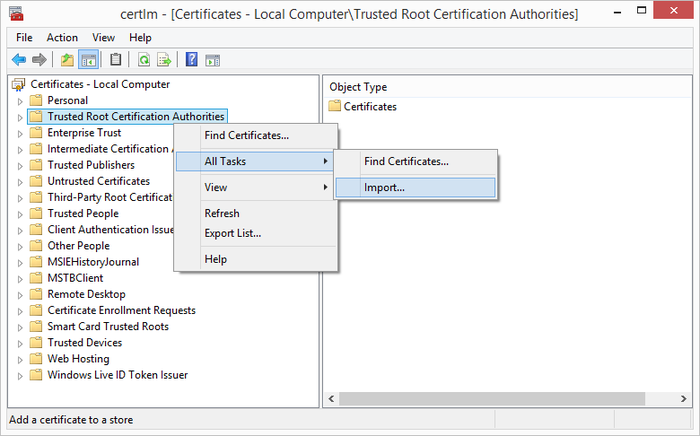
To import the certificate, start the certificate manager by entering Manage computer certificates in the Windows 8 Start Screen (alternatively, start the program certmgr):
- Go to section Trusted Root Certification Authorities and open the context menu.
- Click on All Tasks
- Use Import... to import the Root Certificate provided as *.cer file.