
Difference between revisions of "HowTo:Create a new Classification"
| Line 1: | Line 1: | ||
| + | A new user specific [[Classification]] can be created as a derivative (child) from the ''SYSCLS_ROOT'' classification object in the ''[[Class Browser]]'' control by | ||
| + | |||
| + | # Navigate to the ''SYSCLS_ROOT'' object in the Class Browser | ||
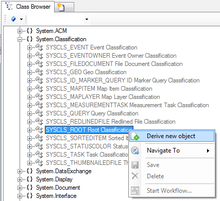
| + | # Create a new classification object with ''Derive new object'' from the context menu<br/>[[File:UI_HowTo_CreateClassification_01.png|220 px|alt=Create new classification|Create new classification]] | ||
| + | # Edit name and description, either | ||
| + | #* in the [[Class_Browser#Editing_name_and_description_of_an_object|Class Browser]] | ||
| + | #* by opening and connecting the new Classification to the ''[[Object Editor]]'' control | ||
| + | # Save the object with {{key press|Ctrl|S}} | ||
| + | |||
[[Category:How-To]] | [[Category:How-To]] | ||
| − | [[Category: | + | [[Category:System Classifications]] |
[[Category:UBIK Studio]] | [[Category:UBIK Studio]] | ||
Revision as of 12:04, 15 October 2013
A new user specific Classification can be created as a derivative (child) from the SYSCLS_ROOT classification object in the Class Browser control by
- Navigate to the SYSCLS_ROOT object in the Class Browser
- Create a new classification object with Derive new object from the context menu
- Edit name and description, either
- in the Class Browser
- by opening and connecting the new Classification to the Object Editor control
- Save the object with Ctrl+S

